
Download ChromaTabs – Colorful Browser Tab Manager for Windows, macOS, Android & iOS
Overview
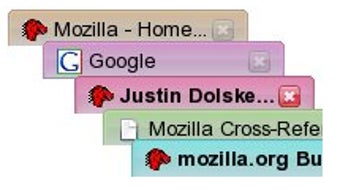
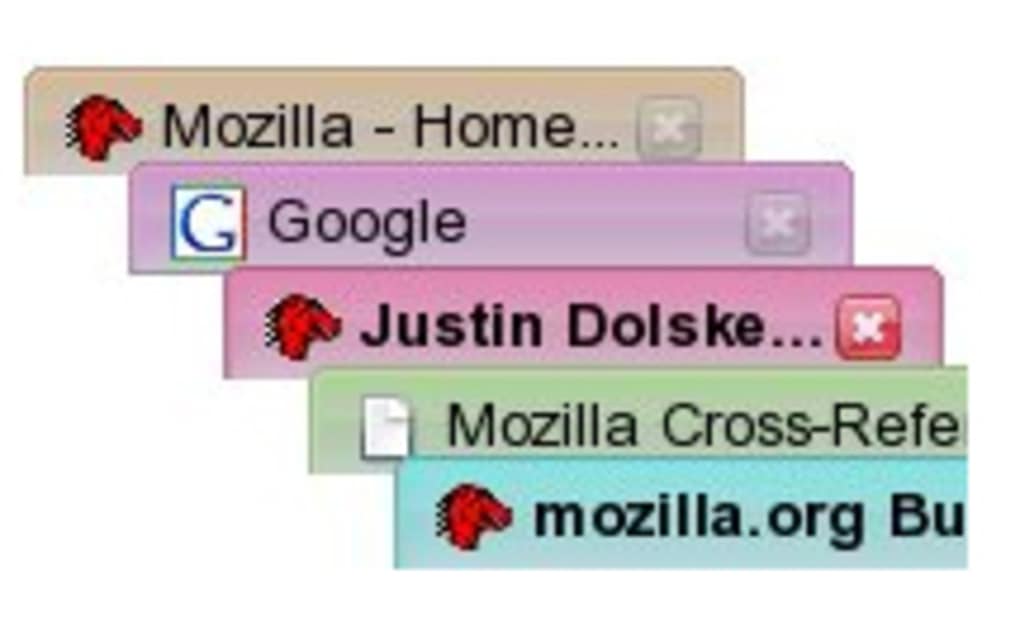
ChromaTabs is a lightweight, free extension that injects a splash of color into every web‑browser tab you open. By assigning a distinct hue to each site, the tool makes it easier to locate a specific page amid a sea of generic tabs. The extension works by generating random colors for new domains while remembering the last hue used for a particular site, ensuring consistency across sessions.
Its intuitive options menu offers granular control over opacity, saturation, and luminosity, allowing power users to fine‑tune the visual palette to match their personal aesthetic or accessibility needs. While the concept is simple, ChromaTabs adds a layer of visual organization that can improve productivity for users who juggle dozens of tabs daily. The extension is compatible with major browsers on Windows, macOS, Android, and iOS, and receives regular updates to stay in sync with the latest browser APIs.
Whether you’re a developer, researcher, or casual surfer, ChromaTabs promises a more vibrant browsing experience without compromising speed or security.
Key Features & Functionality
- Dynamic Color Assignment: Automatically generates a unique color for each new domain, creating a visual fingerprint for every website you visit.
- Persistent Site‑Specific Colors: Remembers the last color used for a domain, so the same site always appears with the same hue on subsequent visits.
- Customizable Color Settings: Adjust opacity, saturation, and luminosity via an easy‑to‑use options panel to match your visual preferences or accessibility requirements.
- Cross‑Platform Support: Fully functional on Windows, macOS, Android, and iOS browsers, including Chrome, Edge, Firefox, and Safari.
- Lightweight & Secure: Minimal impact on browser performance, with no data collection or background telemetry.
- Regular Updates: Frequent releases keep the extension compatible with the latest browser versions and introduce subtle UI enhancements.
- Free Download: Available at no cost, with optional donations to support ongoing development.
Installation, Setup & Daily Usage
Step‑by‑Step Installation Guide
Downloading and installing ChromaTabs is a straightforward process that takes less than two minutes. Follow these steps to get started:
- Visit the official ChromaTabs page on the Chrome Web Store, Microsoft Edge Add‑ons, or Firefox Add‑ons site.
- Click the “Add to [Browser]” button and confirm the permission request. The extension will appear as a small palette icon next to your address bar.
- For mobile browsers, open the respective app store (Google Play Store or Apple App Store), search for “ChromaTabs,” and tap “Install.”
- Once installed, restart your browser to ensure the extension loads correctly.
Configuring Your Color Palette
After installation, click the palette icon to open the options menu. Here you can:
- Set default opacity (0%–100%) to make colors more or less transparent.
- Adjust saturation to control the intensity of each hue.
- Tweak luminosity for brighter or darker shades.
- Enable “Lock color per domain” to keep a site’s color consistent across sessions.
- Choose a “Color‑reset” schedule if you prefer a fresh palette each day or week.
Play around with the sliders until you find a combination that feels comfortable for your eyes. The changes apply instantly, letting you see the effect on existing tabs in real time.
Everyday Workflow Tips
Once configured, ChromaTabs works silently in the background. Each new tab you open receives a color based on the domain’s hash. Over time, you’ll develop an intuitive sense of which color belongs to which site—red for news outlets, blue for social media, green for productivity tools, etc. If you ever need to reset a color, right‑click the tab and select “Reset Color” from the context menu. This flexibility ensures that the tool enhances, rather than hinders, your browsing flow.
Compatibility, Pros & Cons
Supported Platforms: Windows 10/11, macOS Monterey and later, Android 9+, iOS 14+. Compatible browsers include Chrome, Edge, Firefox, Safari, and Chromium‑based mobile browsers.
Pros
- Visually differentiates tabs, reducing the time spent searching for a specific page.
- Fully customizable color settings to match personal or accessibility needs.
- Light on system resources; no noticeable slowdown even with dozens of open tabs.
- Free and regularly updated, ensuring long‑term reliability.
- Cross‑platform consistency, allowing the same experience on desktop and mobile.
Cons
- When more than five tabs are open, certain hues (e.g., green) may repeat, potentially causing minor confusion.
- The initial color palette may feel chaotic until you fine‑tune the settings.
- No built‑in tab grouping; users must rely on the color cues alone for organization.
- Limited to visual differentiation—does not provide functional tab management features like suspending or stacking.
Frequently Asked Questions
Can I use ChromaTabs on multiple browsers simultaneously?
Yes. ChromaTabs is available as a separate extension for each major browser. Install it on Chrome, Edge, Firefox, or Safari, and the color settings will be stored locally per browser.
Does ChromaTabs collect any browsing data?
No. The extension works entirely on the client side. It does not send any data to external servers, and all color assignments are stored locally in your browser’s storage.
How do I reset all colors to default?
Open the ChromaTabs options panel and click the “Reset All Colors” button. This will clear the stored color map, causing the extension to generate new random colors for each domain.
Is there a paid version with advanced features?
Currently ChromaTabs is completely free. The developer has announced plans to keep it ad‑free, but optional donations are accepted to support future development.
Can I customize colors for specific tabs manually?
Yes. Right‑click any tab, select “Change Color,” and choose a hue from the color picker. This manual override will persist until you reset the color or clear all settings.
Conclusion & Call to Action
ChromaTabs delivers a fresh, visual approach to tab management that is both playful and practical. By turning each website into a colored beacon, it reduces the cognitive load associated with hunting for a particular tab, especially for power users who keep many pages open at once. While the palette can occasionally repeat on large tab sets, the extensive customization options let you tailor the experience to your liking, mitigating any potential confusion. The extension’s lightweight footprint, cross‑platform availability, and commitment to privacy make it a trustworthy addition to any browser. If you’re looking for a free, secure way to brighten up your browsing routine while gaining a subtle productivity boost, ChromaTabs is worth a download today.
Click here to download ChromaTabs now and start enjoying a more colorful web experience.
ChromaTabs offers an innovative, visually appealing solution for tab overload. Its customization controls are intuitive, and the free model is a major plus. Minor color repetition on heavy tab loads is the only noticeable drawback, but overall the extension earns a solid 4.3 out of 5.







